Route planning for service fleets

Turn today's job list into a route your driver can run.

Navio turns your existing spreadsheet or job list into an optimised route, a browser-based driver link, a live office dashboard, and a clear record of completed jobs, issues, photos, signatures, and comments.
Import spreadsheet or copy/paste data Optimise and refine route No driver app install
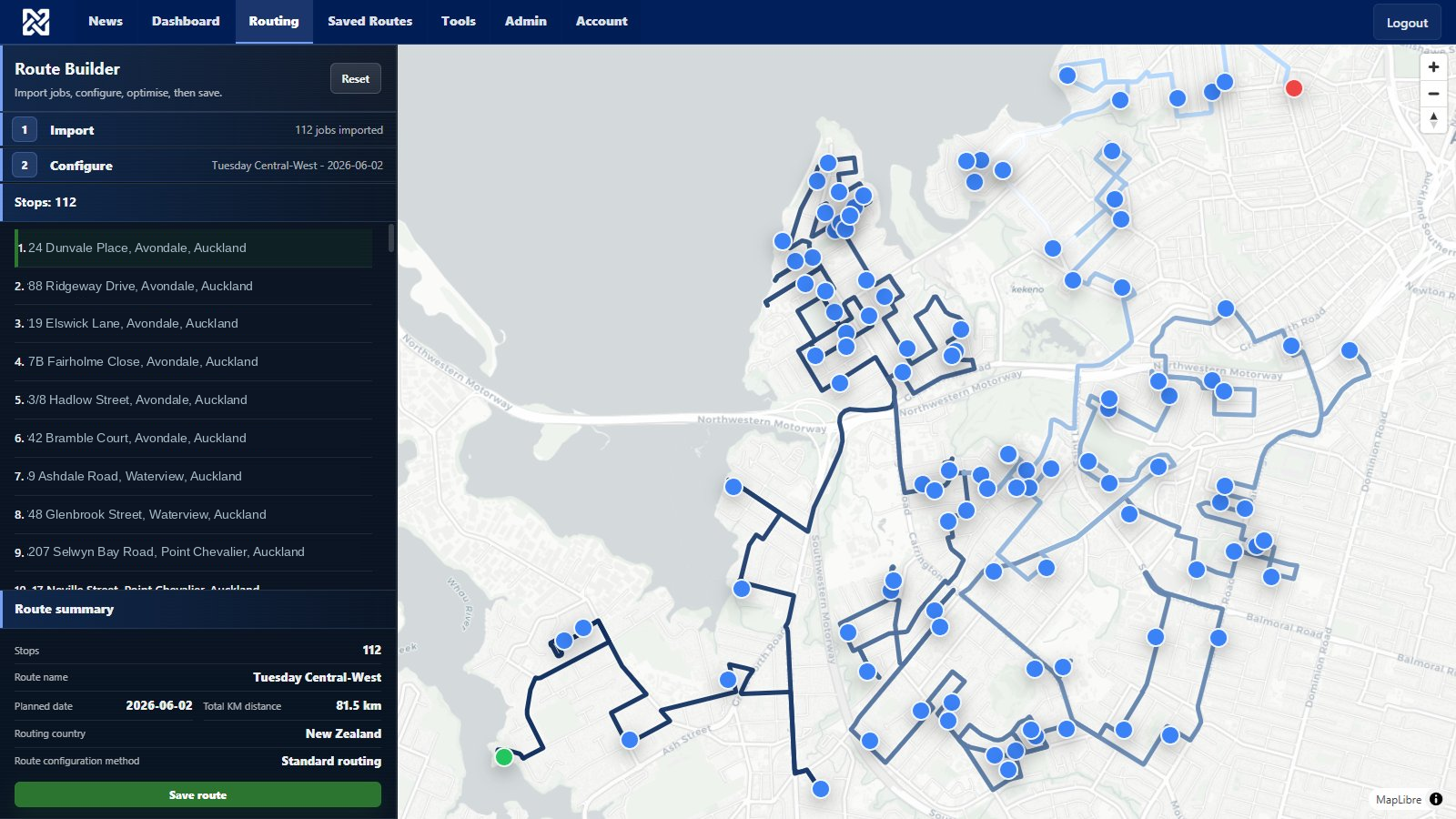
navio.co.nz - Route Builder
Navio route builder - 81 jobs across Auckland West
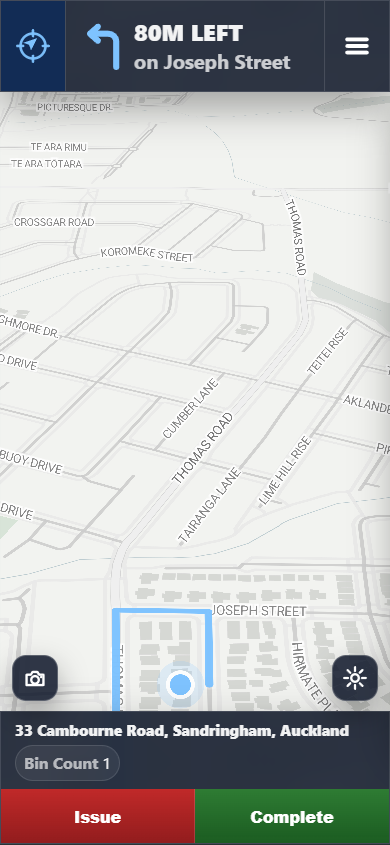
Driver phone view
01 - Plan the route

Start with the job list you already have.

Upload a spreadsheet, or skip the file and paste addresses directly. Navio turns your existing data into route-ready jobs, lets you choose the right fields and country, then builds an optimised sequence you can review before saving.
Import without changing your workflow - use the spreadsheet your office already works from, or paste job data directly.
Choose address and job fields - combine Address, Suburb, and City, while keeping details like Job Type, Notes, customer name, or reference number.
Set the route up properly - choose New Zealand or Australia, pick start and finish jobs, add the planned date, and decide which details the driver should see.
Optimise, review, and refine - use a standard route or left-hand curbside approach, then check the route line and job order before the driver receives it.
Save repeat setup - keep your usual import mapping and route preferences ready for the next job list.
Import - use existing data
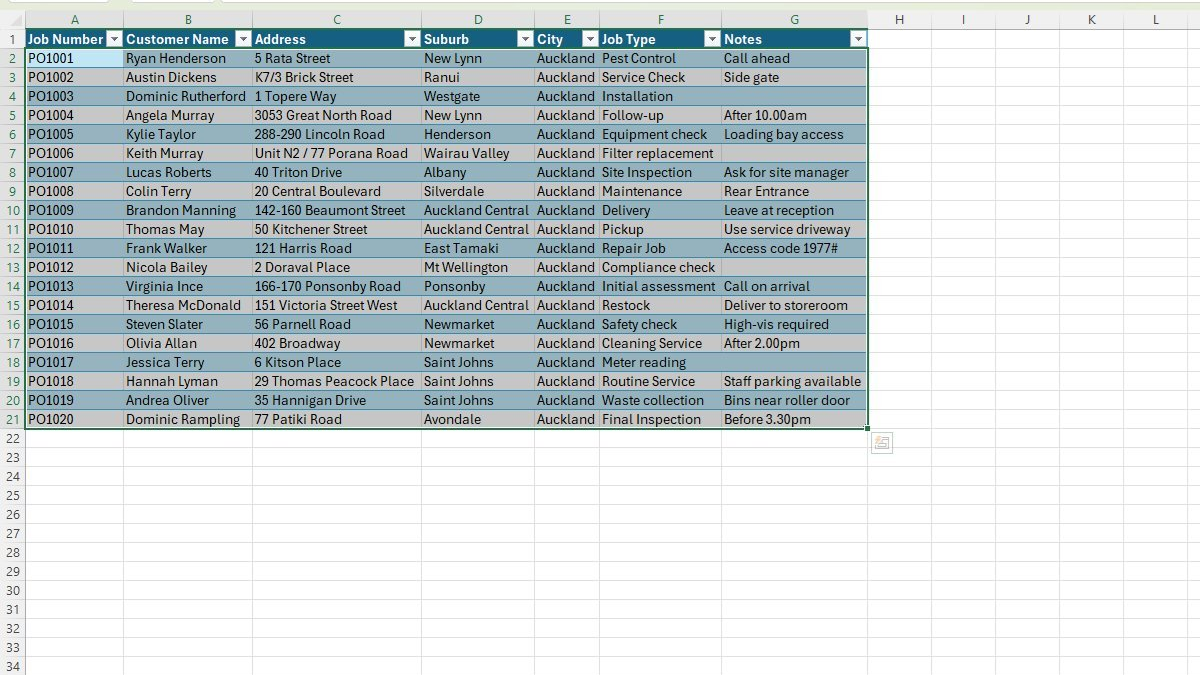
Excel spreadsheet with Auckland job list ready to import

Use existing data. Bring in the job list your office already has.
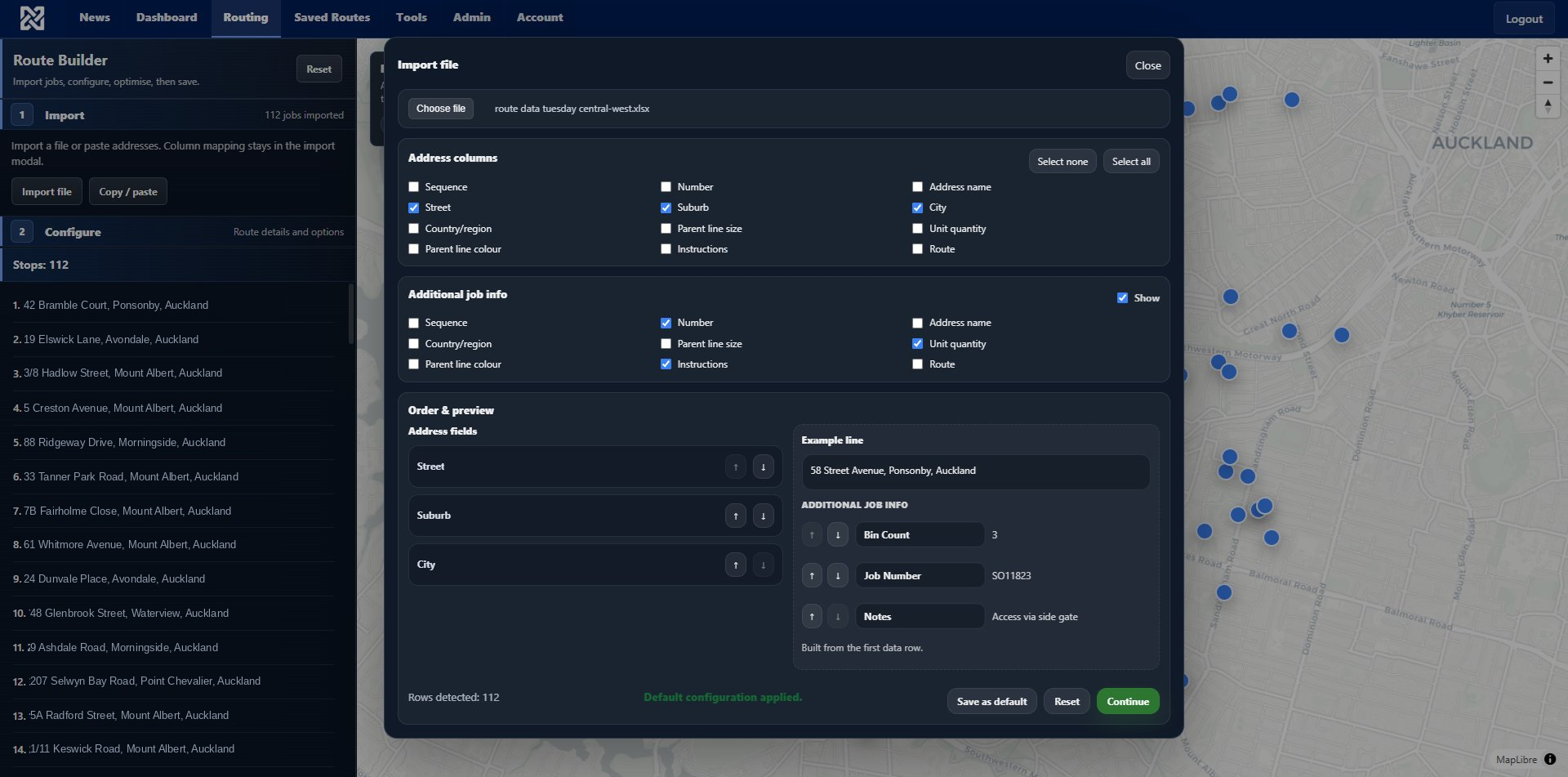
Map fields - address columns plus job details
Column mapping dialog showing address fields and additional job info

Choose the fields. Build the job address and keep the details drivers need.
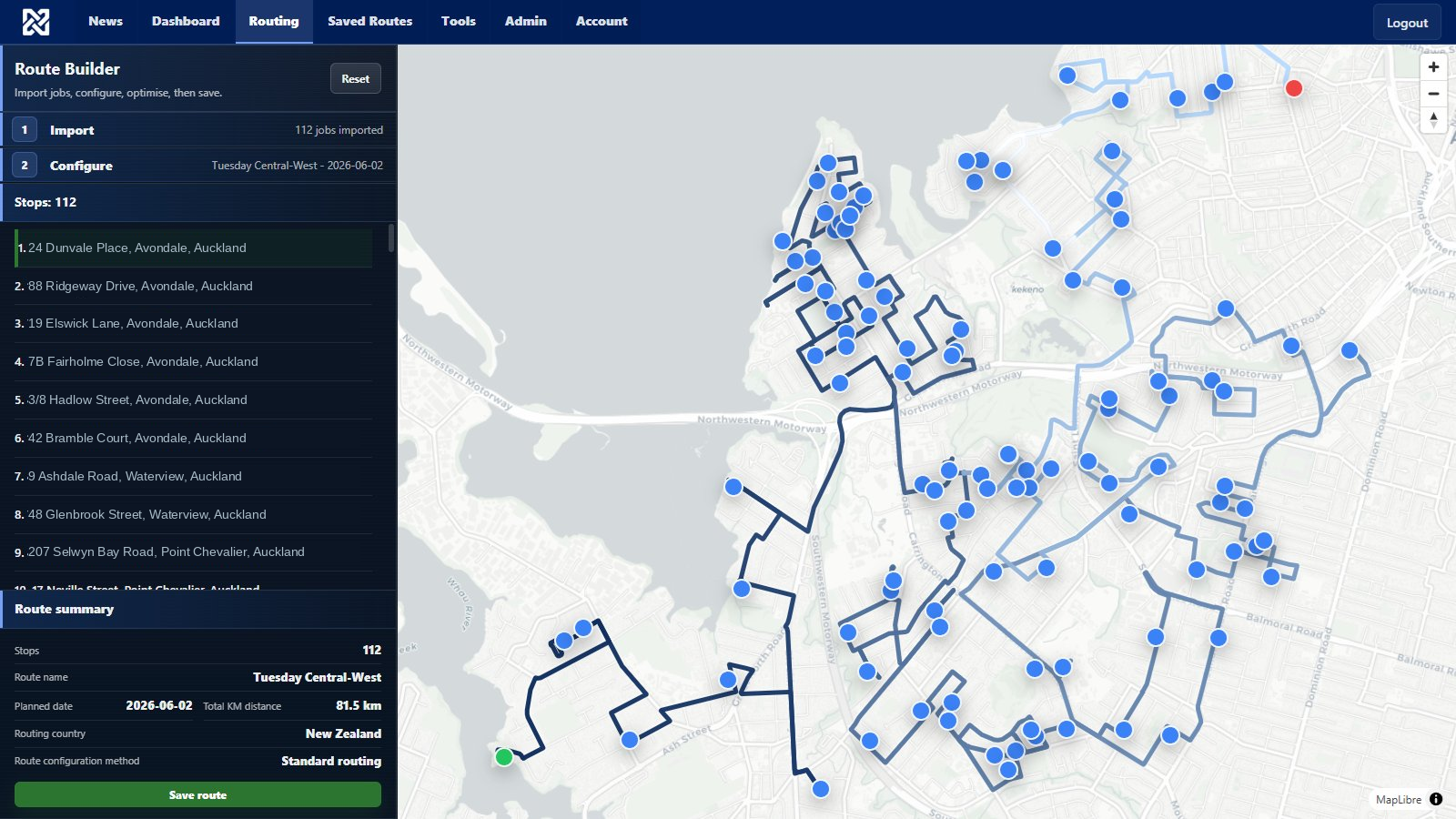
Optimise - route sequence, map, and save
Optimised route across Auckland West with 81 jobs and route summary panel

Route Builder. Review the sequence, route line, start and finish, planned date, and driver-visible details before saving and sharing.

02 - Send the driver

Send a link, not another app.

The driver opens the shared route in a mobile browser. They see the current job, route guidance, and simple actions for completing the job or reporting why it could not be completed. If more than one driver is working the same route, Navio helps them stay out of each other's way.

Browser-based driver view - no app store, no device rollout, and no separate driver account setup.
Essential job actions - drivers mark a job complete or submit an issue with a reason and comment.
Multiple drivers on one route - drivers can identify themselves and work from the same route without accidentally taking the same job.
Driver photos - capture photos at the job for completion proof, access problems, or issue context.
Flexible proof rules - require a photo or signature for completion, or require a photo only for certain issue reasons.
Password-protected driver links - add a password to shared routes so only people with the link and password can open the driver view.
Driver phone showing navigation banner and Issue / Complete buttons

Driver route view Current job, map, and Issue / Complete actions.
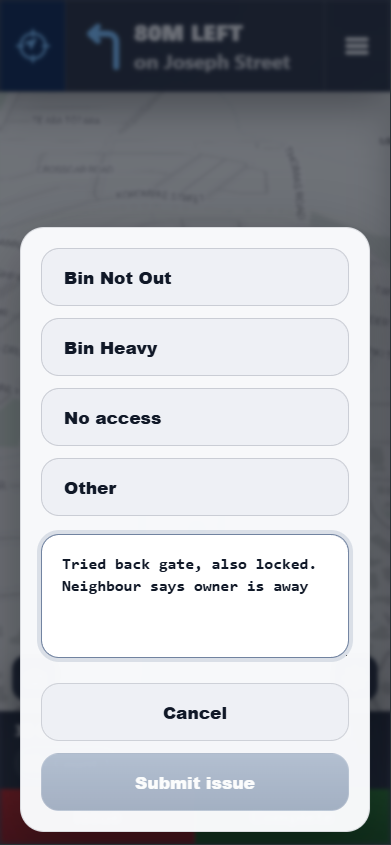
Issue report screen with No access selected and driver comment

Issue capture Reason and comment are stored against the job.

03 - Track the run

Review what happened from the office.

The office can watch today's routes advance on a live dashboard, then open the saved route record for detailed review. Completed, issue, and pending jobs stay visible with driver comments, photos, signatures, and exportable results.

Run progress - see completed, issue, and pending counts as the run advances.
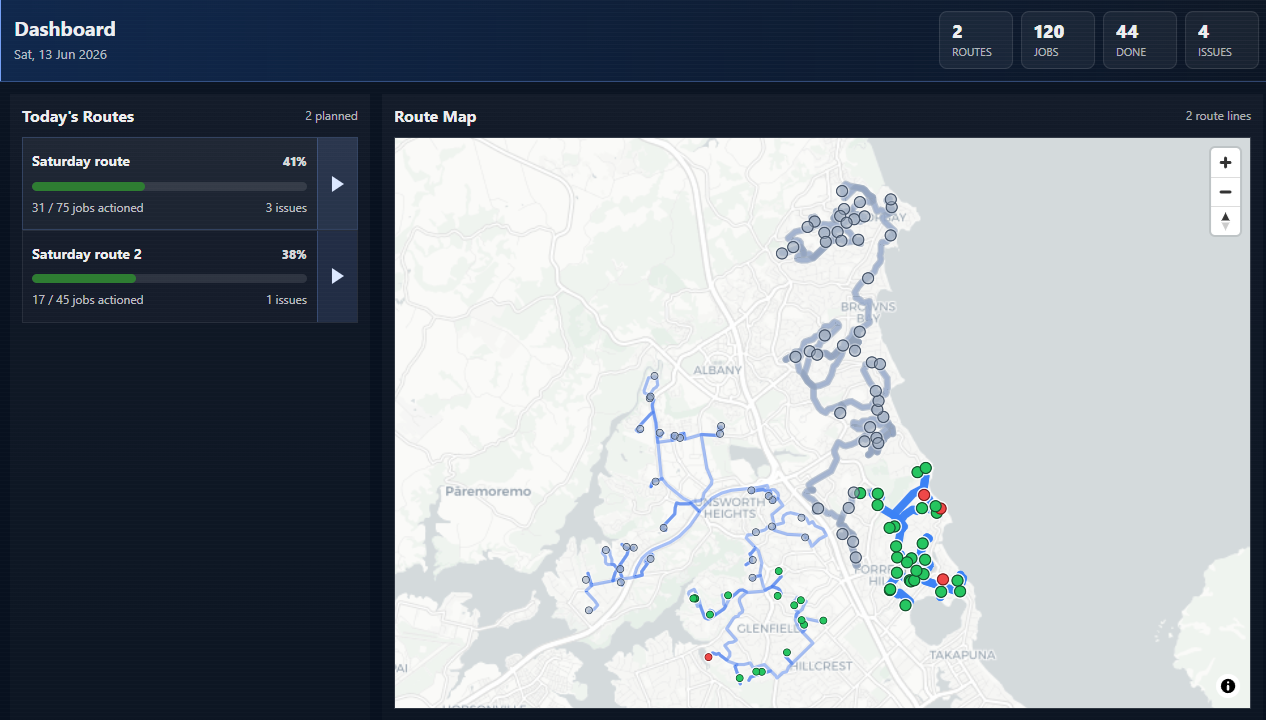
Live dashboard - see today's routes, active drivers, route lines, and issue counts from the office without opening every route one by one.
Colour-coded jobs - completed, issue, and pending markers visible on the map and in the job list.
Photos and signatures - review job evidence alongside driver comments and completion status.
Download the result - export the run record with issue reasons, comments, proof, and job details.
Dashboard - today's routes, progress, and issues
Run review dashboard with colour-coded map and job progress list

Live route view. Today's routes, progress, issues, driver activity, and proof records stay visible from the office.

Route setup

Reusable planning defaults

Save your usual spreadsheet mapping, country, route setup, planned date workflow, and driver-visible fields so repeat routes start faster.

Driver proof

Photos, signatures, and issue reasons

Choose what proof drivers need to collect, tailor the issue reasons to your work, and keep the evidence attached to the job record.

Team access

Simple business controls

Invite team members, manage billing, and use a shared driver-link password for the business without turning dispatch into an IT project.

Navio
The job list was ready. The route wasn't.

Most service teams already have the work: addresses, customer details, job notes, and the jobs that need to be completed. The difficult part is deciding which job should come first, which should follow, and how to avoid unnecessary travel across the day.

Navio was first built to solve that sequencing problem. The driver route, live dashboard, and completed run record were added to carry the plan from the office, through the working day, and back again.

Pricing

Simple pricing for small service fleets.

Start with a real route on the trial. Keep using Navio if it fits how your team already works.

Trial
7-day trial
Free

Test Navio with your own job list before committing.

Route building and optimisation
Driver share links
Run review and export
No credit card required
Growth
Higher volume
Talk to us

For larger job volumes, multiple users, or workflow requirements that need a closer setup conversation.

Higher route and job limits
Multiple user accounts
Workflow discussion and setup
Priority support

Ready to test a real route?

Use Navio with your own job list and see whether the workflow fits the way your fleet already works.

Route planning for service fleets

Turn today's job list into a route your driver can run.

Navio turns your existing spreadsheet or job list into an optimised route, a driver link, and a clear record of what happened at every job.

Import spreadsheet or paste job data Optimise the run before sending No driver app install
Route Builder
Optimised route map in Navio
How Navio works

A simple route workflow, built around the job list you already have.

Plan the route, send a browser link, then track completion from the office.

01 Plan

Start with your existing data.

Upload a spreadsheet or paste addresses directly. Choose the address fields, keep the job details, and build an optimised sequence.

Use the spreadsheet your office already works from. Review the route line and job order before saving.
Import and optimise
Spreadsheet import in Navio
02 Send

Send a link, not another app.

The driver opens the route in a mobile browser and works through each job with simple complete and issue actions.

Browser-based driver route with no install step. Photos, signatures, comments, and issue reporting.
Driver phone route in Navio
03 Track

See what happened while the run is live.

Track completed jobs, issues, notes, photos, signatures, and comments from a live office dashboard.
Know which jobs are complete and which need attention. Keep a route record after the run is finished.
Live dashboard
Live office dashboard in Navio
Why Navio exists

The job list was ready. The route wasn't.

Most service teams already have the work. The difficult part is deciding which job should come first, which should follow, and how to avoid unnecessary travel across the day.

Navio was first built to solve that sequencing problem. The driver route, live dashboard, and completed run record carry the plan from the office, through the working day, and back again.

Try Navio with your own job list.

Start with a real route and see whether the workflow fits the way your fleet already works.

Pricing

Simple pricing for small service fleets.

7-day trial

Free

Test Navio with your own route before committing.

Core plan

$80/mo

Route planning, driver links, live tracking, and completion records.

Built for

Small service fleets that need practical dispatch flow.

Spreadsheet jobsImport the list you already have.
NZ and AURoute setup for local operations.
Driver browserNo app install before the run.
Office recordReview what happened afterward.